Qalam
Correct, logical-order Arabic text extraction from digitally-born PDFs — without OCR.
The Arabic in your PDF is probably wrong
And the worst part is that it looks fine.
Here is a sentence from a Saudi government guidance document. It is boilerplate — the disclaimer every such document carries:
هذا الدليل إرشادي ولا يغني عن الرجوع إلى الأنظمة واللوائح
“This guide is advisory and does not substitute for referring to the regulations and bylaws.”
Now here is what one of the most widely deployed PDF libraries in the world — pdfium, the engine inside Chrome’s PDF viewer — returns when you ask it to extract that line:
إلى الرجوع عن يغني ولا إرشادي الدليل هذا
Every word is intact. Every word is in the wrong place. The sentence has been turned back to front, and if you don’t read Arabic there is nothing about the output that says so — no error, no warning, no exception. It is a well-formed Unicode string of correctly spelled Arabic words. It just doesn’t mean anything.
This article is about why that happens, about four other failures like it, and about the one that I think is genuinely dangerous: the failure that returns no text at all and doesn’t mention it.
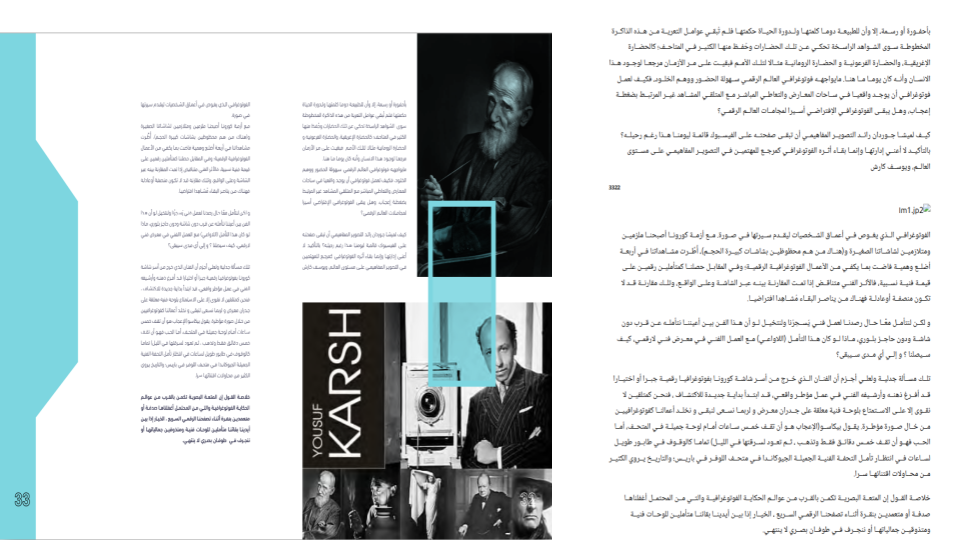
doc.to_html() on the right. Photo
captions, body text and pull quotes all land in the order a reader would take them, and the
right-to-left flow survives into the rendered output. The one broken image is honest rather
than hidden: it is JPEG 2000, which qalam does not decode, so it is reported through
unsupported_reason instead of being silently dropped.A PDF does not contain text
This is the root of all of it, and it surprises people who have never had to look.
A PDF does not store a document. It stores drawing instructions. When you open a file and see a paragraph, what the file actually said was something closer to: set font 12 to scale 20.55, move to coordinate (118.66, 476.77), paint glyph #276, paint glyph #164, paint glyph #013.
Glyph numbers, not letters. Positions, not lines. There is no paragraph in there. There are no words. There is not even, necessarily, a space — many producers represent a space by simply moving the cursor, so the gap between two words can be an absence rather than a character.
Getting text back out is an inverse problem: you are reconstructing an input from its rendered output, and the information you need has been partly thrown away. Specifically, three things you would want are all optional in the format:
- The map from glyph number back to Unicode (
/ToUnicode). May be absent. May be wrong. - The logical structure — which text is a heading, which cells form a table (
/StructTreeRoot). Present only in “tagged” PDFs, which are a small minority of what exists in the world. - The reading order. Never stored at all in an untagged file. It has to be inferred from where things sit on the page.
For English, the naive approach — decode each glyph, stick them together in the order they appear in the file — works often enough that its failures look like edge cases you can ignore.
For Arabic it fails systematically, because Arabic manages to hit every weak point in that list simultaneously.
Five ways it breaks
1. The words come out backwards
Arabic is written right to left. PDF paints glyphs left to right, in visual order. So an Arabic word is laid down starting from its last letter, and a naive reader that concatenates in painting order gets every word reversed — and then, at the line level, every word in the wrong position.
That’s the pdfium example above. Fixing it means running the Unicode Bidirectional Algorithm (UAX #9) backwards: from visual order back to logical order. And it means running it on positioned glyphs, not on a string, because by the time you have a string the damage is done.
This is the one failure a user genuinely cannot repair afterwards. Once the glyphs have been flattened into a string in the wrong sequence, the information needed to undo it — where each glyph was on the page — is gone.
إلى الرجوع عن يغني ولا إرشادي الدليل هذا
هذا الدليل إرشادي ولا يغني عن الرجوع إلى
2. The letters are the wrong letters
Arabic is cursive, and its letters change shape depending on where they sit in a word — isolated, initial, medial, final. The letter heh is ه alone, هـ at the start, ـهـ in the middle.
Unicode has a block for these shaped variants — the Presentation Forms — and it exists essentially for backwards compatibility with old systems. You are not supposed to store text in it. But a great many PDF producers do exactly that, because the shaped glyph is what they were drawing.
So extraction gives you this:
ﺍﻟﺪﻟﻴﻞ ﺍﻹﺭﺷﺎﺩﻱ
الدليل الإرشادي
To a human those look nearly identical. To a computer they share not one single codepoint. Your tokenizer will not match them. Your search index will not find them. Your embeddings will be garbage. In one 44-page document we counted 31,080 presentation-form characters in the output of a popular library.
This one is at least fixable by the caller — unicodedata.normalize("NFKC", text) folds most
of them back. Which brings us to the trap.
3. Fixing #2 breaks #1
Some Arabic letter pairs are drawn as a single glyph. The commonest is lam-alef (لا): one glyph, two letters.
Normalization expands that glyph into its two letters. Reordering reverses the sequence. And the order in which you do those two operations changes the answer.
Normalize first, and you now have two separate characters where you had one glyph — so when you reverse, they swap. ولا (“and not”) becomes وال (“and the”). Both are real Arabic. One of them is a different word. The sentence still reads as fluent text; it has simply been altered.
Reorder first, while the ligature is still one indivisible glyph, and it survives the reversal untouched. Normalize afterwards and it expands in the right place.
The whole rule is: reorder, then normalize. Almost everything else in this project follows from getting that order right and applying it consistently.
This generalizes further than the lam-alef. Some fonts map one glyph number to several letters directly — we found fourteen such codes in one file, mapping to لم, لج, بح, في, هم, لله. Those sequences are already in reading order, and a reversal that reaches inside them corrupts the word: المعظم comes back as املعظم. So the rule becomes: a multi-character mapping is an atom, and the reversal operates on atoms, never inside them.
4. The vowel marks drift
Arabic can carry diacritics — tashkeel — that mark short vowels and doubled consonants. They are combining characters, drawn above and below the letter they belong to.
Two separate bugs attack them, and both are silent.
The first is that they are painted at a horizontal position inside their base letter. Sort glyphs left to right and the mark lands after its base; reverse the line and it lands before it — attached to the wrong letter.
The second is stranger. NFKC of an isolated mark-bearing form emits a literal space
before the mark, because Unicode gives an isolated diacritic a space to sit on for display
purposes. In extracted text the mark is never isolated — it belongs to the letter beside it —
so normalization inserts a space into the middle of a word.
Here is one word, تتضمَّن, through three tools:
تتضم ً ن
تتضم َّن
تتضمَّن
Note the middle one carefully — that is a space in the middle of the word. And it is not PyMuPDF’s fault: it placed the marks correctly and the space arrived when the caller normalized. Any tool that normalizes naively inherits this bug, which is why it is worth naming rather than scoring as a win.
5. The columns interleave
None of the above involves a single glyph decoding wrong. This one doesn’t either, and it may be the most destructive.
Text on a page is a set of coordinates. To produce a reading order you group glyphs into lines by their vertical position — which is exactly right on a single-column page, and catastrophic on a page with three columns side by side. You take one fragment from each column per line and interleave three unrelated paragraphs into nonsense. Every character decoded perfectly. The result is unreadable.
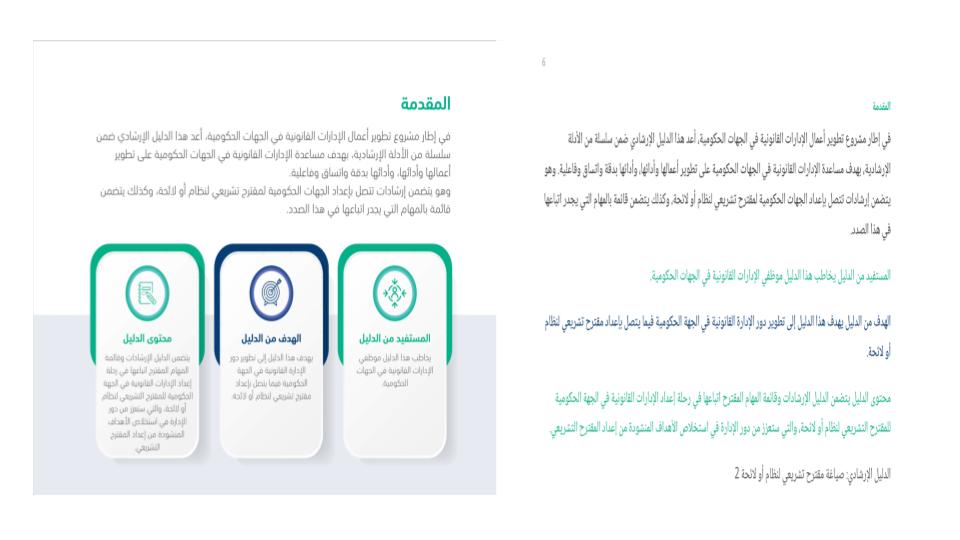
The fix is a recursive XY-cut: find the widest empty band on the page, split there, and recurse into both halves. Because you always split at the widest gap, a full-width heading gets removed before you go looking for the columns beneath it no explicit “is this a heading” rule is needed. Two details that took real documents to learn: thresholds have to scale with the local type size (a 20 pt gap is a column gutter in 9 pt text and ordinary word spacing at 40 pt), and column direction is a property of the page, not the line, so a column of Latin figures can’t flip the page’s reading order.
The failure that returns no error
Every problem so far is at least visible to someone who reads Arabic. Here is one that isn’t visible to anyone.
Sometimes a PDF has no usable text layer. It is a scan — pictures of pages, no glyphs at all.
Or its fonts carry no /ToUnicode map, so the glyph numbers cannot be turned back into
characters by any amount of parsing. Either way, there is no text to extract.
Ask any mainstream extractor for that page and you get back:
""
Ask it for a page that is genuinely blank — a section divider, the back of a cover — and you get back:
""
These are the same answer. There is no flag, no exception, no field you can check. And this is the normal case, not an exotic one: in our 44-page test document, four pages are unrecoverable. pdfium returns empty for all four. PyMuPDF returns empty for all four. Neither mentions it.
Now scale that up. You run ten thousand documents through a pipeline to build a corpus. Some percentage of pages are scanned. Those pages are silently dropped, your job reports complete success, and the damage is invisible — not just at ingestion, but forever, because nothing downstream can distinguish “this document didn’t discuss that topic” from “we lost page 12.”
I think this is the real bug in PDF extraction, and it isn’t an accuracy problem. It’s an honesty problem.
So say something
Every page qalam extracts carries a verdict:
| verdict | meaning |
|---|---|
ok |
Every glyph resolved. The text can be trusted. |
degraded |
Text came out, but something is wrong. Here are the reasons. |
needs_ocr |
There is no usable text layer. Emitting the text would be worse than useless. |
import qalam

doc = qalam.Document("report.pdf")

print(doc.confidence)         # 0.91
print(doc.pages_needing_ocr)  # [2, 3, 42, 43]   <- hand these to an OCR engine

for page in doc:
    if page.verdict != "ok":
        print(page.number, page.reasons)
        # 17 ['3 of 1841 glyph codes unresolved']
        # 42 ['no text layer: the page paints no glyphs at all']
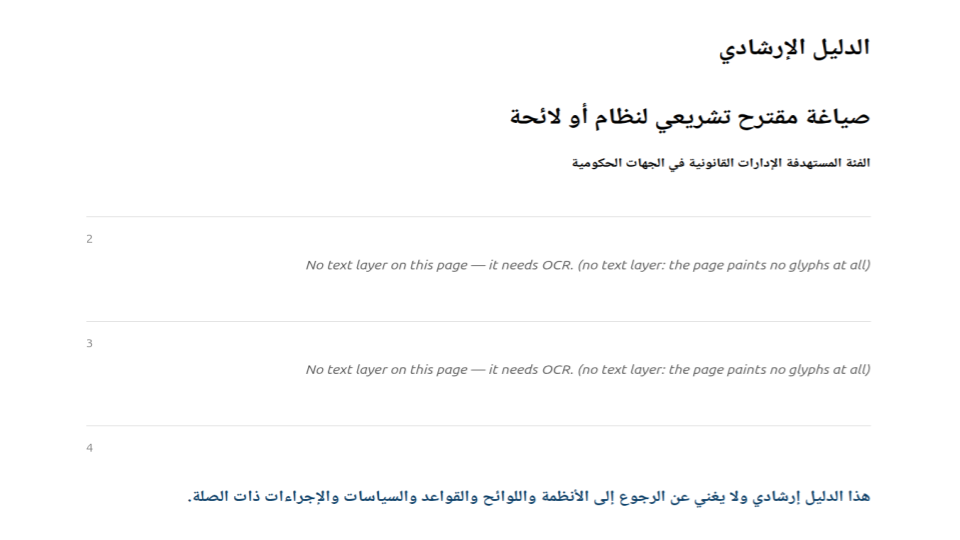
"" for them — identical to what it returns for a blank page. qalam names them
instead: "no text layer: the page paints no glyphs at all." That sentence is the
difference between a corpus with a known gap and a corpus with an invisible one.Two decisions inside that scoring are worth stating, because both are the opposite of what you’d write first.
ok requires that everything resolved — a 99.9% success rate is degraded. Every
unresolved glyph is a character missing from the output. A tolerance there would let real
losses pass as clean, which is the exact failure the project exists to prevent.
A page with no glyphs scores 0.0, not 1.0. The natural metric is “what fraction of glyphs resolved successfully?” On a scanned page, zero glyphs are painted, zero fail, and that metric returns a perfect score. It confidently certifies the one page you most needed it to flag. “Nothing failed” is not “everything worked.”
Beyond characters: tables
Getting the letters right is the floor. Most of the documents people actually want — budgets, statistical yearbooks, financial statements — are mostly tables, and a table flattened into a line of text has lost the thing that made it a table.
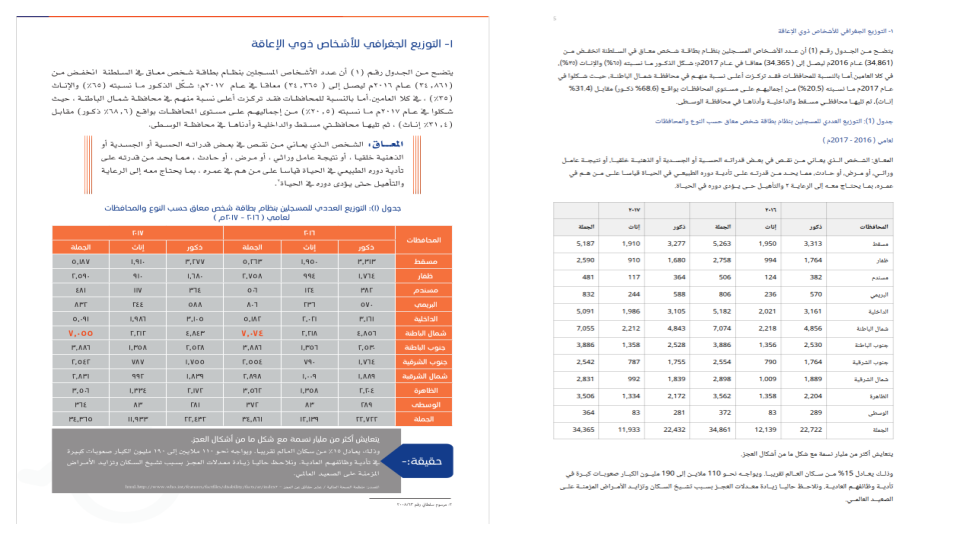
table.to_rows() goes straight to csv.writer.Two findings here were worth the trouble.
Geometry cannot decide what is a table. A rounded frame drawn twice — one copy offset behind the other as a drop shadow — produces four horizontal rules and four vertical ones, every one spanning the full extent. That is geometrically indistinguishable from a 3×3 grid, and reading it as one shreds a paragraph into empty cells. What separates a table from a frame isn’t where the lines are, it’s what’s inside: a real table fills most of its cells. So the rejection has to happen after the text is placed, not during detection.
Some tables have no lines at all. A financial report in our corpus holds six columns held together by alignment alone. The trick that works is letting the rows vote: each row votes only across its own extent, and a position becomes a column boundary when most of the rows crossing it leave it clear. A title or a section heading that spans the full width then can’t hide the columns underneath it.
Throughout, the bias is deliberate and one-directional: a false table is worse than a missed one. Missing a table leaves text merely unstructured. Inventing one destroys it. So the bar for an inferred table sits at four columns — two columns of prose with a badge between them look exactly like a table geometrically, and the only thing distinguishing them is that one is wrapped prose, which is a fact about language rather than about ink. The cost is stated rather than hidden: a genuine three-column borderless table gets missed.
What it looks like to use
import qalam

text = qalam.extract_text("guide.pdf")
That’s the whole simple case. Pages with no usable text layer contribute nothing — a scanned page never masquerades as a result.
When you want structure, a page is an ordered list of typed blocks:
for block in qalam.Document("guide.pdf").page(6).blocks:
    if block.kind == "table":
        for row in block.to_rows():
            print(row)
    elif block.kind == "image":
        block.save(block.file_name)
    else:
        print(block.text)
Flat text and structured blocks are the same data — page.text is defined as the
concatenation of the blocks — so the two views cannot drift apart.
There is also an HTML export, which reconstructs reading order, headings, colour and RTL tables into one self-contained file:
It’s a Rust core with a Python binding — one abi3 wheel per platform covers Python 3.9 and
up — and a CLI. On a 44-page document, extraction takes about 0.22 s, which is within 1.4× of
both tools it’s more correct than. Speed was never the point, but it’s not a sacrifice either.
What it doesn’t do
No OCR — scanned pages are detected and reported, not read. No PDF creation or editing. No
pixel-perfect layout reproduction; you get ordered typed blocks, not a visual clone.
Three-column borderless tables are missed by design. Soft-mask compositing isn’t implemented,
so a logo whose entire shape lives in its transparency mask extracts byte-correctly and looks
blank — and says so, via a dropped_transparency flag.
And this is young software validated against a small corpus. More Arabic PDFs is by far the most valuable contribution — especially ones that break something. Every rule described in this article exists because a real document proved the previous rule wrong.
Try it
pip install qalam
import qalam
doc = qalam.Document("your-file.pdf")
print(doc.pages_needing_ocr)
The source is on GitHub under the MIT licence. The repository includes the golden test corpus, the comparison harness against pdfium and PyMuPDF that produced the numbers here, and a design document with a findings log — a chronological record of what each real document taught us, including several bugs that produced correct-looking, wrong output.
That log is published deliberately. The failures turned out to be more instructive than the design.